Text Pages
Overview
Text pages have a number of uses on the site. They can be used:
To include an additional page on the site and link to it.
Search engine landing page or Gateway page
To Access Text Pages, go to Website Content and then the submenu Text Pages:
Add a New Text Page
Click on the + Add Page button:
You will be directed to the following page:
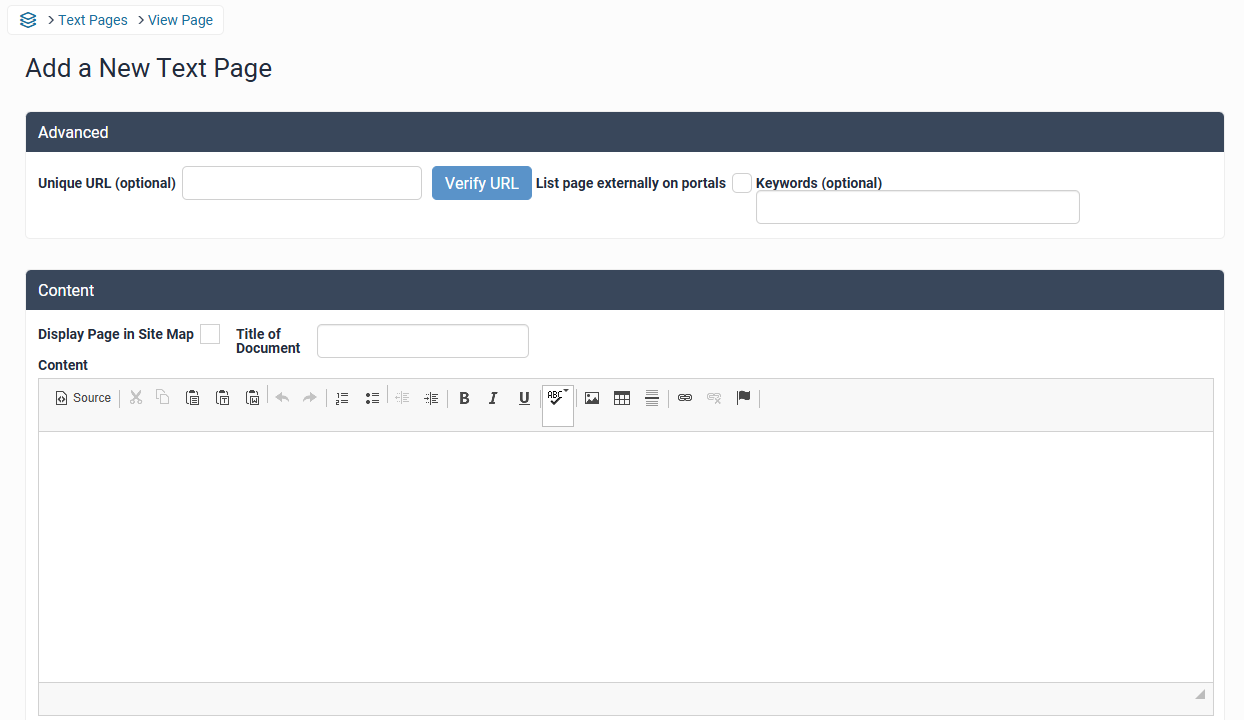
This page allows you to complete the information.
You can display the page on the property site map by clicking on the ‘Display Page In Site Map’ box.
Provide a title for the page in the Title of Document box. For example, you may call the Document your ‘Terms and Conditions.’
Enter the relevant text to the page you wish to create in the ‘Content’ section. You can also add images, videos, links etc.
Provide a Meta Description. This is a Meta tag and is used by the Search Engine to assist in indexing the page.
You can enter the key words for the section, again this is for the Search Engine optimisation.
It is this page that SEO specialists will create pages for the site.
Please contact support@levart.com.au if you require assistance with your Text Pages.