Promotional Widget
Overview
Levart’s Promotional Widget functionality allows properties to integrate an image and link to the design of your website. This is generally used for Specials and Packages, but any page can be linked to via the Promotional Widget. Only some website designs include Promotional Widget functionality.
Set Up
In order to set up your Promotional Widget, you will need an image and the URL of the page or Package you would like to link to.
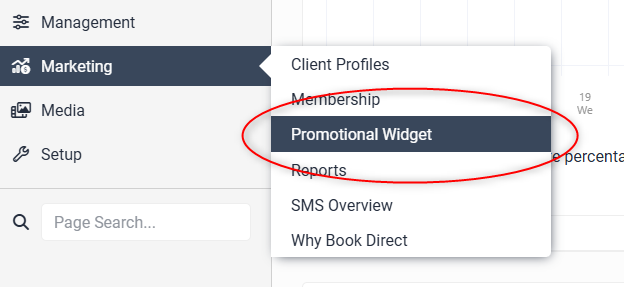
Once you have these, go to the Marketing section and click on Promotional Widget in your Levart Admin site
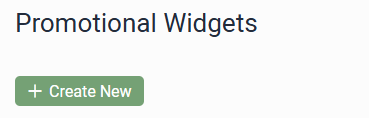
Click the + Create New button
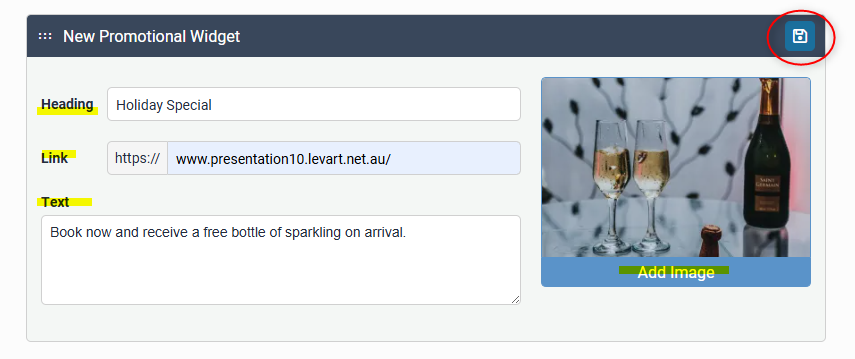
Enter the text that you would like displayed over the image in the Heading textbox
Enter a brief description in the Text textbox - on certain Levart themes this text is displayed. On some themes it is not. Text is required to create the widget.
Place the URL you would like the Promotional Widget to link to in the Link textbox
Click Add Image to upload or select an image for the background for the Promotional Widget
Ensure you click the Save icon to save the Promotional Widget. The Promotional Widget will display on your website and will link visitors to the URL entered when clicked.
Repeat the above steps as many times as you like to add multiple Promotional Widgets.
You can change the order of your Promotional Widgets by using the move icon to drag widgets into your intended order.
Ensure you click the Save icon whenever you make changes.
Should you require any further assistance, feel free to contact support@levart.com.au